1. Engineering Overview & How the Circuit Works
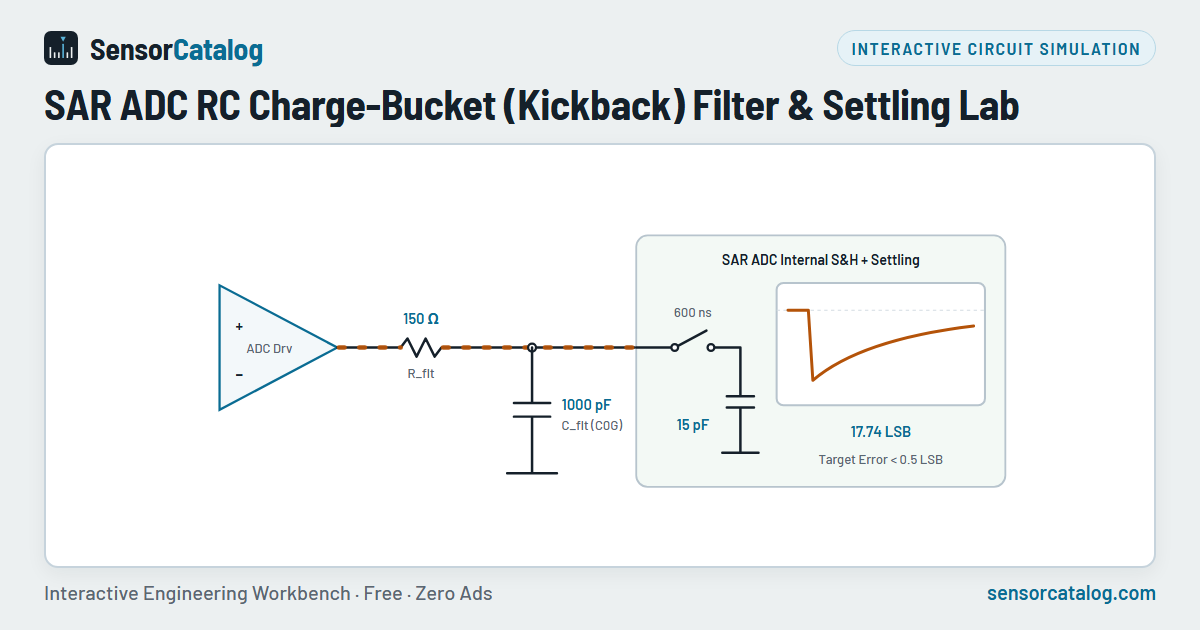
When a 12-to-16-bit SAR ADC closes its internal sample-and-hold switch, its internal capacitor C_SH injects a sharp charge-redistribution kickback pulse back onto the input pin. If the external RC charge-bucket filter (R_flt + C_flt) is mis-sized, the voltage fails to settle within t_acq — silently degrading a 16-bit ADC to 10-bit accuracy!
The 20× Charge-Bucket Rule: Sizing C_flt ≥ 10×–20× C_SH (using C0G/NP0 ceramic) acts as a local charge reservoir that immediately supplies C_SH with minimal droop (ΔV = V_fs · C_SH / (C_flt + C_SH)), while R_flt isolates the op-amp from capacitive instability.
Settling Error in LSBs: After acquisition window t_acq, remaining error is 2^N × [C_SH / (C_flt + C_SH)] × exp(−t_acq / (R_flt · C_flt)). Keep this strictly below 0.5 LSB for full N-bit linearity.
2. Step-by-step: Sizing a zero-kickback SAR ADC RC front-end
1Look up C_SH and t_acq from the MCU / ADC datasheet
STM32 internal ADCs typically have C_SH ≈ 5–10 pF; discrete 16-bit SAR ADCs (ADS8860) ≈ 20–45 pF.
2Pick C_flt = 20× C_SH using C0G/NP0 dielectric only
X7R/Y5V capacitors exhibit piezoelectric and voltage-coefficient distortion that ruins 16-bit THD.
3Solve R_flt so settling error < 0.5 LSB within t_acq
Keep R_flt high enough (≥ 20–50 Ω) for op-amp phase margin, yet low enough to settle inside t_acq.
4Place C_flt within 2 mm of the ADC pin with short AGND return
Minimize trace inductance between C_flt and ADC pin so high-speed switching transients stay localized.
3. Field Troubleshooting & Multimeter Diagnostics
| Symptom | Root Cause | Multimeter Check | Corrective Fix |
|---|---|---|---|
| Channel 2 reading drifts whenever Channel 1 voltage changes sharply | Muxed SAR ADC C_SH carries residual charge from Channel 1 and R_flt is too large to settle in t_acq | Double firmware ADC sample cycles (SMPR) and see if crosstalk vanishes | Lower R_flt, increase C_flt to 20× C_SH, or lengthen t_acq in ADC config |
4. Frequently Asked Engineering Questions
Why can’t I just put a huge 100 nF filter cap on a fast SAR ADC?
With a 1 kΩ resistor, 100 nF creates a 100 µs time constant — far too slow for fast signals, and it can make the driving op-amp oscillate unless isolated!
5. Related Calculators, Guides & Other Sensor Circuits
- Anti-aliasing RC filter calculator
- ADC resolution calculator
- Photodiode Transimpedance Amplifier (TIA) Circuit
- Low-Side vs High-Side Current Shunt Amplifier Circuit
- Piezoelectric / IEPE (ICP) Constant-Current Conditioning Circuit
- Comparator with Hysteresis (Schmitt Trigger) Threshold Circuit
- AC Current Transformer (CT) Burden, Mid-Rail Bias & TVS Clamp
- 3-Electrode Electrochemical Gas Sensor Potentiostat Circuit
- Piezoelectric Charge Amplifier (Cable-Immune Force & Ultrasonic)
- PNP (Sourcing) 3-Wire Sensor Output Circuit
- NPN (Sinking) 3-Wire Sensor Output Circuit
- NAMUR 2-Wire Intrinsic Safety Sensor Circuit
- 2-Wire 4–20 mA Current Loop & Protected Receiver Circuit